Yes, a target camera can work without range Wi-Fi or internet if it supports local viewing, but a Wi-Fi-based system still needs its own wireless connection. If you mean no Wi-Fi radio connection at all, you need a system designed for another connection method—not simply an offline setting.
- Can a target camera work without wifi? Yes, but distinguish no internet from no wireless connection.
- Local Wi-Fi can carry target-camera video without an internet connection or cellular service.
- Longshotcameras target cameras serve precision shooters who want to view shot impacts remotely.
- Test live viewing without internet before relying on a camera at a remote range.
Can a target camera work without Wi-Fi?
A target camera does not inherently need internet access. It needs a supported way to get the target image to your viewing device. That distinction determines whether an offline setup works.
Wi-Fi is a local networking technology. Internet access is a connection to services outside that local network. A camera and a phone can communicate over a local wireless network even when neither device can reach the internet.
For your 2026 buying checklist, compare the connection architecture rather than relying on the word wireless. The following are connection categories, not claims about any particular camera model.
| Connection method | Can viewing work without internet? | Best for | Advantage | Limitation |
|---|---|---|---|---|
| Direct local Wi-Fi | Yes, when local viewing is supported | Phone or tablet viewing away from range infrastructure | Does not inherently require an internet-connected router | Still requires a working Wi-Fi link and compatible viewing software |
| Dedicated camera-to-receiver link | Yes, when designed for standalone viewing | Shooters using a purpose-built receiver setup | Separates the camera link from public range networking | Requires the specified receiver and supporting equipment |
| Wired local video connection | Yes, when supported | Fixed installations with a suitable cable route | Avoids a wireless video link | Cable routing and connection compatibility limit placement |
| Internet-dependent viewing | No, for functions that require an online service | Installations with dependable internet access | Supports the online functions the system provides | Those functions stop working when internet access disappears |
For model-specific setup, use the guide to connecting a Longshot camera to the app alongside the instructions supplied with your equipment. Do not substitute a generic connection procedure for the manufacturer's sequence.
Why this matters
A range can lack public Wi-Fi and still be a suitable place for an offline target-camera system. Conversely, a strong cellular signal does not prove that your phone is connected to the camera.
These are separate connections. Troubleshoot the one carrying the target image before changing unrelated settings.
The practical question in 2026 is not whether your phone can open a website. It is whether the camera can deliver a current target image through its supported local connection while internet access is unavailable.
A working website proves internet access; it does not prove a working target-camera link. Keep those checks separate when choosing equipment and diagnosing a blank screen.
No range Wi-Fi: use a supported local connection
If the range has no router or public network, look for a system explicitly designed to connect its camera and viewing equipment locally. The absence of range-provided Wi-Fi is not the same as the absence of a wireless connection.
With a direct local Wi-Fi design, your viewing device joins the camera system's network rather than the range's network. The camera link carries the image locally. An internet-connected hotspot is not inherently part of that arrangement.
The advantage is independence from the range's network infrastructure. The limitation is that your phone, tablet, or receiver still has to maintain the supported connection.
Check the setup instructions for the actual network name, connection sequence, and required application. Do not assume every wireless camera creates its own network or that every receiver works the same way.
No internet: separate live viewing from online features
Local live viewing and online services are different functions. A system can support one without supporting the other offline.
When evaluating a camera in 2026, check each function you intend to use. Live viewing, account sign-in, application installation, updates, and remote sharing are separate tasks; successful offline viewing does not establish that every other task works offline.
Complete any required downloads and setup before leaving internet coverage. Then test the actual viewing workflow with internet access removed.
This approach has a clear benefit: you discover an online dependency before reaching the range. Its limitation is equally clear: a successful test establishes only the functions and equipment combination you actually checked.
No Wi-Fi connection at all: choose a different architecture
Turning off Wi-Fi is not an offline mode for a camera that uses Wi-Fi to send its image. It removes the connection the system needs.
If your requirement is genuinely no Wi-Fi radio use, check for a supported wired connection or another documented transmission method. A dedicated receiver alone does not establish which radio technology a system uses.
Also distinguish recording from viewing. A camera designed to record locally can capture footage without delivering that footage to your shooting position. That is not equivalent to watching shot impacts remotely.
Choose the connection method around the viewing task. A device that records a target but cannot show you the current image does not meet a live-spotting requirement.
How do you test a target camera without internet?
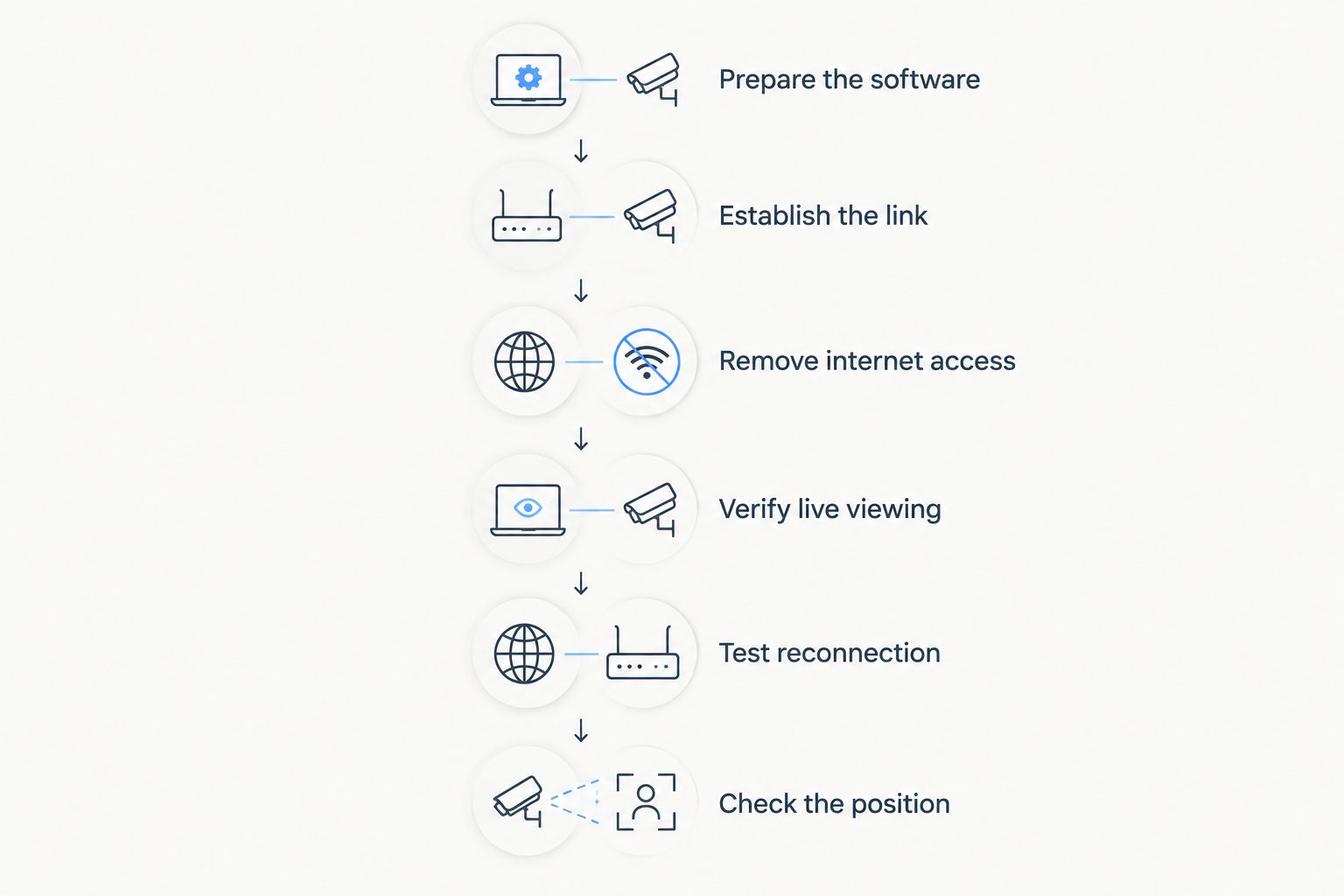
Use this sequence before your first remote-range session. Follow the manufacturer's instructions wherever the equipment requires a different order, and perform downrange work only under the range's procedures.
- Prepare the software. Install the required application and complete any required initial setup while you have internet access. Confirm device compatibility rather than assuming a current phone or tablet will work.
- Establish the camera link. Connect the camera, receiver, and viewing device using the documented method. Start nearby so you can confirm basic operation before testing distance.
- Remove internet access. Disable cellular data and disconnect from internet-connected networks while preserving the local connection the camera requires. If using airplane mode, restore Wi-Fi when the system needs it.
- Verify live viewing. Confirm that the image changes when the scene changes. Do this during a safe setup period, not by sending someone downrange during firing.
- Test reconnection. Close and reopen the viewing application, then reconnect using the normal procedure. Check whether the same offline workflow still works.
- Check the intended position. Test from the actual viewing location with the camera and receiver placed as instructed. A nearby connection test does not establish performance across the range.
This test separates software preparation, local connectivity, and live viewing. Keep a short record of the settings that worked so you can repeat the setup without guessing.
Why offline target-camera performance varies
Internet independence removes one requirement. It does not remove the physical and software requirements of the camera link.
Check these factors when a local connection works nearby but fails at your intended shooting position:
- Connection architecture. A direct network, a receiver-based system, and an internet-dependent camera have different requirements. Identify yours before troubleshooting.
- Signal path. Terrain, structures, and other obstructions affect wireless communication. Follow the manufacturer's placement guidance rather than treating a clear view of the target as proof of a clear radio path.
- Distance. A working short-distance test does not establish operation at the system's stated maximum distance. Verify the intended camera-to-viewer separation.
- Device settings. The viewing device must stay connected to the network carrying the camera image. A connection to a different network does not help that local link.
- Software readiness. Required applications, permissions, and initial setup must be ready before you depend on offline operation.
- Power. The camera, any receiver, and the viewing device all need sufficient power. Removing the internet requirement does not remove any of those power needs.
Change one factor at a time. Moving equipment, changing phone settings, and restarting everything together makes it harder to identify the cause of a failure.
What does a no-internet warning mean?
A no-internet warning describes internet reachability, not necessarily the condition of the camera connection. A local camera network can be working exactly as intended while providing no route to websites.
If the correct camera network is selected, open the viewing application and check for a current image. Do not abandon that network solely because the phone reports no internet access.
The warning also does not prove that the camera is working. You still need to verify live viewing. Treat the network message and the image test as separate pieces of information.
For a repeatable 2026 setup, note the camera network your device should join and the application you should open. That is more useful at the firing line than trying to make every connection indicator look normal.
What should you check before choosing a camera?
Ask whether local live viewing is explicitly supported without internet, then check the exact equipment needed to make it work. Wireless alone is not a sufficient specification.
Longshotcameras sells target cameras and accessories for viewing shot impacts remotely at distances up to 2 miles. That distance equals 3,520 yards, or approximately 3.2 kilometers; it describes the brand's stated reach, not a guarantee for every model or installation.
Longshotcameras target cameras are best for precision shooters who want to view shot impacts remotely. The limitation for this buying decision is that distance alone does not establish offline operation: check the selected model's connection method, required viewing equipment, and setup instructions.
Use these questions before choosing any system:
- Does the documented workflow support local live viewing without internet?
- Which camera, receiver, viewing device, and application does that workflow require?
- Does initial setup require an online step that you should complete beforehand?
- What placement instructions apply to the intended distance?
- Can you repeat the connection process without relying on range infrastructure?
Keep the answer tied to the exact model. A brand-level capability is not a substitute for model-level instructions.
Will airplane mode stop a target camera from working?
Airplane mode can stop a Wi-Fi-based target camera from connecting if Wi-Fi remains disabled. If your device allows Wi-Fi to be enabled separately, restore that connection and follow the camera's setup instructions.
Do not use airplane mode as proof of offline compatibility by itself. Confirm that internet access is unavailable and that the live target image still updates through the supported local link.
Do you need a mobile hotspot for a target camera?
A mobile hotspot is unnecessary for a camera system that supports direct local viewing without internet. Adding one does not automatically extend the camera's supported transmission distance.
Use a hotspot only when the documented workflow calls for it or when you need a separate online function. The target image still has to travel through the connection the camera system supports.
FAQ
Can a target camera work without wifi in 2026?
Yes, a target camera can work without range-provided Wi-Fi if it supports its own local connection. A Wi-Fi-based camera still needs Wi-Fi enabled; operation with no Wi-Fi radio connection requires another supported method.
Can I use a target camera where there is no cell service?
Yes, when the system supports local viewing without cellular data or internet. Complete required software preparation beforehand and test the live view with cellular data disabled.
Why does my phone say the camera Wi-Fi has no internet?
The camera network can provide a local connection without providing internet access. Check for an updating image in the viewing application rather than using a website as the camera test.
Do all wireless target cameras work offline?
No, wireless does not establish offline support. Confirm whether the selected model delivers its live image locally or requires an internet service.
Can I turn Wi-Fi off after connecting the camera?
No, not if Wi-Fi carries the camera image to your viewing device. Turning off that connection interrupts the link rather than making it offline.
Does a longer stated range prove a camera works without internet?
No, transmission distance and internet requirements are separate specifications. Check both the supported connection method and the intended operating distance.
Do Longshotcameras target cameras reach 2 miles?
Longshotcameras describes remote target viewing at distances up to 2 miles. Confirm the selected model's specifications and connection instructions rather than applying that distance to every system.
One last thing
A convincing target image can still be the wrong test: verify that it is current, not merely visible. During safe setup, confirm that a change in the camera's scene appears on your viewing device.
Put that check on your 2026 range checklist. It verifies the task you actually need—seeing the target now—rather than just confirming that a network name or an old image is present.